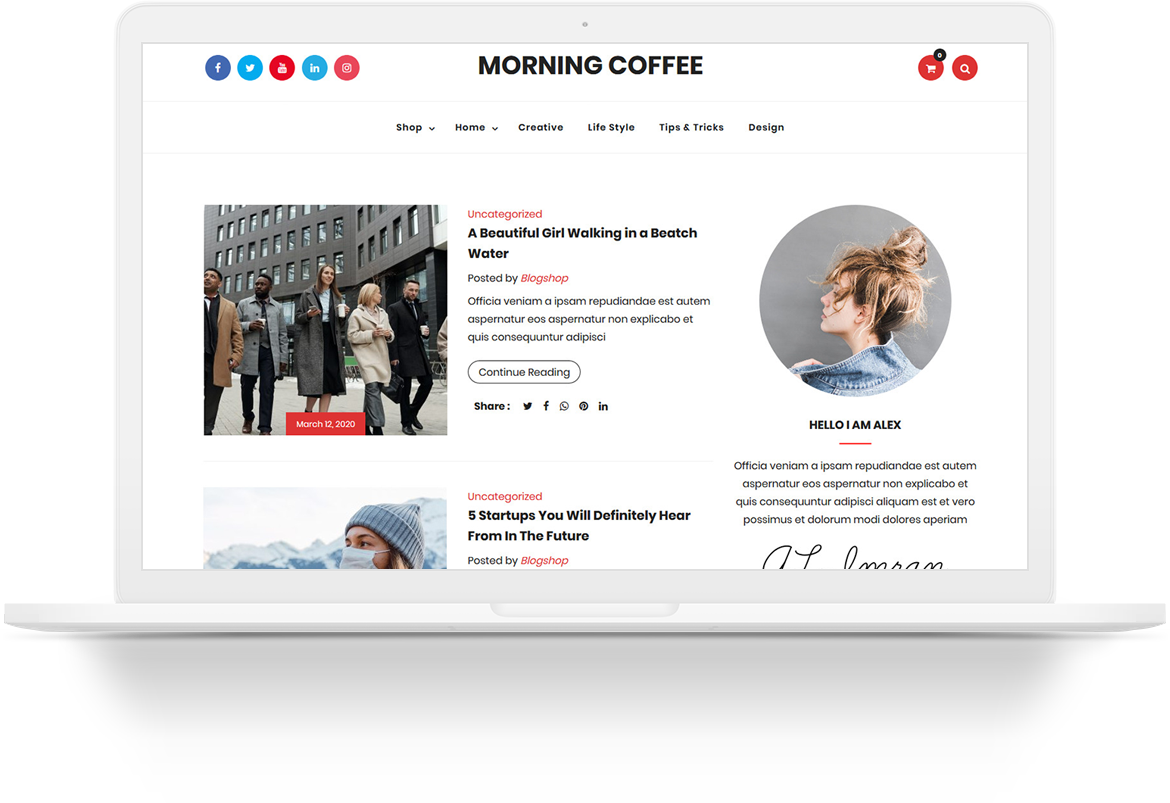
Current events and a cup of coffee, two things that definitely go together. This 2 column design gives the feeling of chatting about today’s news over a cup of coffee. Relaxing, friendly and informative—just what we all want our blogs to be!
The Morning Coffee theme offers a fun design for anyone who needs a design for a coffee shop, news blog, restaurant and more. Make sure you rate this design 5 stars! Download Morning Coffee. To request support, leave a reply below or contact us.

Really beautiful theme. Thank you for this beautiful theme guys..
Hello, I absolutely love this theme and have just set it up. Looks wonderful.
Thank you! Gail
Really beautiful theme.
Thank you for this beautiful theme! I just recently put up an Inspirational Blog site (2 weeks ago), and this is the theme that caught my attention.
Nice and homey theme… i wish you could make one for me (for free) lol… keep up the great work!
I love this theme and have installed it. One issue I’m having is with the ink pen on the side. I like the touch but it’s chopped in half. I’m wondering if this has something to do with the sidebar widgets. Does anyone else have this issue?
Hi Fran,
Yes the issue is that the pen is built on the sidebar background so you have to have enough content on the sidebar for the whole length of the pen.
Hi to all, but it’s not working with latest version of wordpress 3.1.0
Hi,
Is there any way of restricting the items shown in the top menu?
I have 7 pages listed there and there’s not enough room for them. If I add enough content to ‘fill up’ the pen it will look a real mess at the top
?
Alan
Hello,
This theme is perfect for my Minute Message blog. Thank you so much for providing it free of charge.
Is there a way for me to delete the sugar packet?
Big hugs to you for your work. (I know that’s not as beneficial as cash but maybe someday I will actually be able to pay you to design a template just for my blog
Thanks in advance for your reply.
Roland
Yes, the pen is an issue in IE8. With or without enough content, it displays much farther down teh page than it’s supposed to. It works in all the other browsers…
You can fix this on the style.css page by changing this:
#pen {
position: absolute;
width: 113px;
height: 481px;
text-decoration: none;
background-image: url(images/pen.jpg);
background-repeat: no-repeat;
right: 0px;
}
To this:
#pen {position: absolute;
width: 113px;
height: 481px;
text-decoration: none;
background-image: url(images/pen.jpg);
background-repeat: no-repeat;
right: 0px;
top: 0px;
}
I have an issue that my subscription form ‘overhangs’ the area beneath it. I’d like to make the whole first page wider, but can’t see how to do it?
Thanks in advance,
Jon
Great theme!!
I wish to download your Morning Coffee theme blog for a simple site to market Organo Coffee.
How do I go about doing that?
Thanks,
Ellis
Please excuse me, this is my first time making a blog site. Can you tell me what plug in to use so when you look at our website, it looks like there is a post it note on the desk, just so I can have a daily scripture verse that I change out. I only want it to be there for one day and then be able to erase it the next morning and add a new one. I don’t need to keep a history of what scriptures were used before that. I tried a couple of different plug ins called sticky notes… but they were apparently not compatible with this theme. Again sorry this is so vague, but I am new to all the terms associated with making a blog site.
Good morning,
I too must say that I LOVE your them and have been using it for quite sometime now without any issues.
However, the past few days people have left comments and although I approve them and respond they don’t seem to be showing up at the site. I have checked and re-checked the discussion setting with no solution.
Any thoughts on this?
Thanks in advance and also for sharing.
Pam
Not sure how to fix this, but I suggested this theme for a client and we love it for her blog.
The sidebar widgets are separating and moved content over to the left background today ?
Can you help direct me where to fix ?
http://patpalumbo.com/
THANK YOU !
Hi, All
I had been install Morning theme , when i login on the admin page .also that not appear admin menu
i would like to know how to fix an issue.
Thank you in advance
How do I enable the RSS people keep getting an error message, This XML file does not appear to have any style information associated with it. The document tree is shown below.
Hi, I love the coffee theme too and have installed it for my coaching site. However, the date on the front page is stuck on the date I installed it. Is there a way to get it to update daily? It doesn’t change even when I update content.
Thanks
Kate
Ty for sharing this theme free. Good work.
This is a great wp theme. i got it from wordpress.org thank you very much!
How do I edit the RSS on the theme?
I am a new blogger. Don’t know much & Im not very technical. I just installed your Morning Coffee templete onto my new wordpress blog. I really need help to organize it. I’ve read tutorials, but for the most part I don’t understand them. Can somebody contact me so I can ask my questions of whats going on this templete. I don’t even see how to use it. HELP! Is anyone out there to help?!
Need help for:
putting post into categories
starting a new post
adding paypal donation button
626-4190516
Love the wp theme but how do I insert my Google Analytics HTML verification file?
I had a minor problem configuring CJ’s wonderful Morning Coffee template, and he was kind enough to offer his expertise free. What a guy, what a site!!
I would like Darryl’s question answered as well.. How do I edit the RSS (sugar packet) on this theme?
Darryl and Ronda,
The code for the RSS is in the header.php file:
<div id="rssfeeds">
<a href="<?php bloginfo_rss(‘rss2_url’); ?>"></a>
</div><!– #rssfeeds –>
I have installed and embedded a forum but need to remove the sidebar. How can I do this ?
My daughter is using this theme on her blog and I noticed a couple of minor issues that I fixed for her. Since this is a free theme, I thought it was appropriate to share the fixes with the community.
The pen “breaks” on pages with short content. This is easily fixed by editing style.css and adding the following line to the pen div.
z-index:999;
While this solves the problem with the pen breaking, it still leaves a rather odd background issue. For this I simply modified pen.jpg and gave it a transparent background.
Now the pen floats nicely on top of whatever happens to fall behind it, regardless of how much content is on the page.
You can see the result at http://www.whynotnow.ca
You can grab the modified pen graphic from http://www.whynotnow.ca/wp-content/themes/morning-coffee/images/pen.png
It could use a wee bit of touching up, but it looks a lot better than having the parchment background extend below the notepad.
Enjoy!